Convert Image to GIF Online for free
When words fall short, a custom GIF created with Gifmake.top can convey your message perfectly. Our online tool makes converting images into animated GIFs quick, easy, and completely free. Just upload your favorite images, and watch as they transform into captivating GIFs in moments. No registration, no watermarks, and no software installation required - create high-quality GIFs from your JPEG and PNG images in seconds.
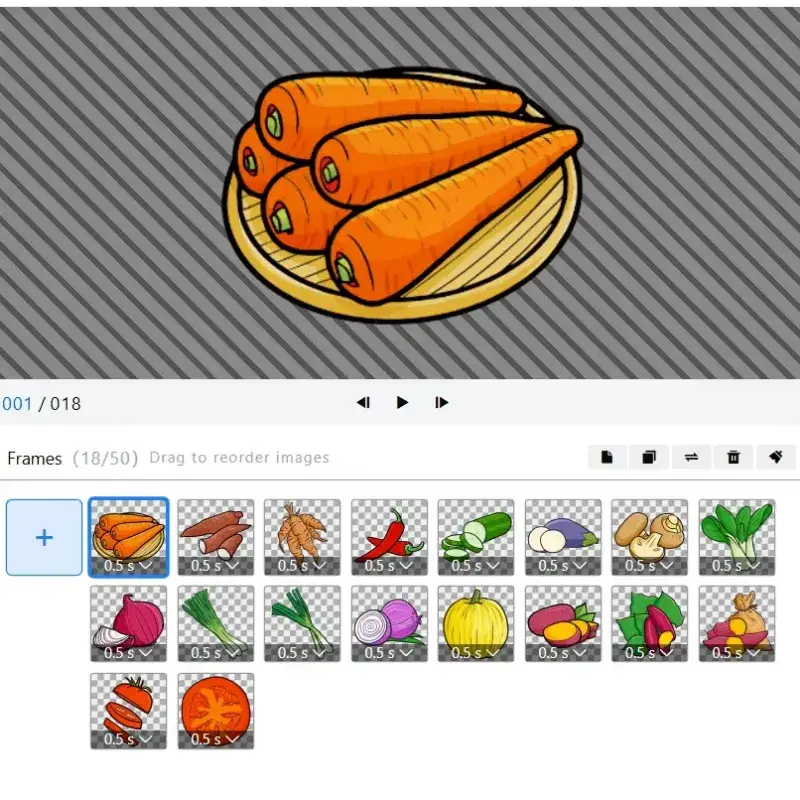
How to Convert Your Image to a GIF
1. Upload Your Images
Drag and drop your images into the GIF converter. In just seconds, you'll see your images start to transform into a GIF. Support for JPEG and PNG formats, no file size limits for basic conversions, and no registration needed to start uploading.
2. Customize Your GIF
Utilize the intuitive timeline to fine - tune the duration of your GIF. You can split, cut, or trim the frames to achieve the perfect length. Adjust frame timing, add text overlays, apply filters, and crop images to create the ideal animated GIF for your needs.

3. Download and Share
Once you're satisfied with your GIF, download it. Or, if you want to make further changes, you can continue editing. Download your high-quality GIF with no watermarks, and share directly to social media platforms or save to your device for later use.
Unlock the Power of Image to GIF Conversion
Showcase Your Products and Services Creatively
With Gifmake.top, you can create stunning GIFs to showcase your offerings in eye - catching ways. Whether you're a small business owner, social media manager, or content creator, our free image to GIF converter helps you turn static product images into dynamic animations that capture attention and drive engagement.
For example, use a GIF in an Instagram story to demonstrate a new product, make a meme to highlight before - and - after transformations, or create a Facebook post featuring different yoga poses from your next class. The possibilities are endless, and our tool makes it easy to bring your creative vision to life without any technical skills.
Plus, our built - in Content Scheduler lets you plan and publish your social posts to your favorite channels effortlessly. Save time and streamline your content creation process with all the tools you need in one place, completely free of charge.
Create Perfectly Timed Animated GIFs
The timeline feature in gifmake.top allows you to have full control over the duration of your GIF. Unlike other free online GIF makers that limit your editing options, our tool gives you complete flexibility to adjust frame timing, add pauses, and create the perfect pacing for your animation.
You can split, cut, or trim frames to get the ideal length. Remove unwanted frames, reorder sequences, and adjust the speed of your animation to match your brand voice and messaging. Whether you need a short 2-second GIF for social media or a longer animation for your website, our tool delivers precise control over every aspect of your creation.
Use our Image to GIF converter to announce upcoming business events, special offers, highlight seasonal sales, promote new class schedules, workshops, or any other creative idea you have in mind. Create professional-looking animations that stand out from static images and drive more engagement with your audience.
Unleash the Potential of Your Images
Elevate your business promotions by editing your GIFs in gifmake.top. Our comprehensive editing tools let you enhance your static images before converting them to animated GIFs, ensuring every frame looks its best and your final product stands out from the competition.
Enhance your images with a wide range of filters, text effects, and more. Adjust brightness, contrast, and saturation to perfect your images, add branded text overlays to reinforce your message, and apply creative filters to match your brand aesthetic. Our user-friendly editing interface makes it easy to achieve professional results without any design experience.
Once you've perfected your images, effortlessly transform them into attention - grabbing animated GIFs that will generate excitement among your audience. Whether you're promoting a new product, sharing a tutorial, or creating engaging social media content, our image to GIF converter helps you turn ordinary images into extraordinary animations that drive results.
Free to Use with No Hidden Costs
Our image to GIF converter is completely free to use with no hidden fees, no watermarks, and no time limits on usage. Unlike other online tools that offer a "free" version with limited functionality or add watermarks to your creations, we believe in providing full access to all our features at no cost to our users.
Create as many GIFs as you need for personal or commercial use, upload unlimited images, and access all editing tools without ever being asked to upgrade to a paid plan. No credit card is required to use our service, and we never collect any personal information from our users - just upload your images and start creating stunning GIFs immediately.
We're able to offer our tool for free by displaying non-intrusive advertising on our site, which helps cover our server and development costs while keeping our service completely free for our users. You'll never be interrupted by pop-ups or forced to watch ads to use our tool - just a clean, user-friendly experience from start to finish.
High-Quality Output Every Time
One of the biggest concerns when converting images to GIFs is losing quality in the process. At Gifmake.top, we've developed advanced conversion technology that preserves the clarity and detail of your original images, ensuring your GIFs look professional and captivating every time.
Our tool maintains the resolution of your original images, so even high-resolution product photos or detailed graphics will look crisp and clear in your final GIF. We use optimized compression algorithms that reduce file size without sacrificing quality, making your GIFs easy to share online while maintaining their visual appeal.
Whether you're converting a single image or a series of high-resolution photos, our image to GIF converter delivers consistent, high-quality results that make your content stand out. Create GIFs that look great on any device, from mobile phones to desktop computers, and ensure your message is seen clearly by your audience.
Frequently Asked Questions
Absolutely! You can edit your images both before and after the conversion process. Gifmake.top provides a range of editing tools, including filters, text overlays, and cropping options, enabling you to perfect your images for an amazing animated GIF. Adjust brightness, contrast, and saturation, add branded text, apply creative filters, and crop your images to the perfect dimensions before creating your GIF. Our user-friendly editing interface makes it easy to achieve professional results without any design experience or technical skills.
Our platform supports JPEG and PNG file formats for image uploads. You can seamlessly upload images in these formats to create your GIFs, and our tool automatically converts them to high-quality GIF animations while preserving the original image quality. We're constantly expanding our format support, but JPEG and PNG cover the vast majority of use cases for our users. If you have images in other formats, we recommend converting them to JPEG or PNG using a free image converter before uploading to our tool.
Yes, gifmake.top is designed to maintain the high quality of your images during the conversion. Your GIFs will retain clarity and detail, looking professional and captivating. We use advanced compression algorithms that reduce file size without sacrificing visual quality, ensuring your GIFs look great on any device while remaining easy to share online. Unlike other free GIF makers that compress images to the point of losing detail, our technology preserves the resolution and clarity of your original images, resulting in crisp, professional-looking animations every time.
Creating a GIF is extremely fast. After uploading your images and customizing the settings, your GIF can be generated in just a few seconds, making it an ideal time - efficient tool for busy business owners and content creators. The exact conversion time depends on the number and size of your images, but most users receive their completed GIF within 2-5 seconds of clicking the convert button. Our cloud-based processing ensures fast conversions even for large batches of images, so you never have to wait long to get your finished product.
Yes, we offer a free plan for everyone that includes full access to all our image to GIF conversion features with no limitations. You can upload unlimited JPEG and PNG images, access all editing tools (filters, text overlays, cropping), customize GIF duration and frame timing, and download your creations with no watermarks or attribution requirements. There's no registration required, no time limits on usage, and no hidden fees - our entire service is completely free to use for both personal and commercial purposes. We're able to offer our tool for free through non-intrusive advertising on our site, which helps cover our operational costs while keeping the service free for our users.
No registration, account creation, or email verification is required to use our image to GIF converter. We respect your privacy and want to make GIF creation as simple and accessible as possible. Simply visit our website, upload your images, customize your GIF, and download your creation - no personal information required at any step. We do not store your images or created GIFs on our servers, so you can use our tool with complete privacy and peace of mind.
Yes, you are free to use any GIF created with Gifmake.top for both personal and commercial purposes, including marketing, advertising, social media, and e-commerce. There are no restrictions on how you use your created GIFs, and you do not need to provide attribution to our site when using your creations. We only ask that you do not use our tool to create GIFs that violate copyright laws or contain inappropriate content, and that you respect the intellectual property rights of others when uploading images to our platform.