Convert video to GIF for free
Use Now
Transform your favorite video clips into professional-quality GIFs with our free online converter. No registration required, 2GB file size limit, and full customization options to create the perfect GIF for any platform.
Powerful Video to GIF Conversion Features
Easy Video Upload
Our intuitive upload system makes it simple to get your videos into our converter, with multiple options to suit your workflow:
· Drag and Drop or Browse: You can either drag and drop a video file directly onto our platform or browse through your device to upload the video you want to convert. No complicated steps or technical knowledge required - just select your video and start the conversion process.
· File Size Limit: The maximum file size for upload is 2 GBs, which is significantly larger than most free online video to GIF converters allow. This means you can convert longer video clips without having to trim them first or use multiple tools.
· Free and No Credit Card Required: Our service is absolutely free to use, and you don't need to provide any credit card information. Unlike other "free" tools that require payment for full functionality, we offer complete access to all features at no cost to our users.
· Terms and Privacy: By uploading your image or video, you agree to the gifmake.top Terms of Use and Privacy Policy. We take your privacy seriously and automatically delete all uploaded files from our servers after 24 hours, ensuring your content remains secure.
How to Make a GIF from a Video
Creating a GIF from any video file is a simple three-step process that takes just seconds to complete:
1. Select Your Video: Upload a video from your device. You can choose any video that's up to 2 GB in size, including MP4, MOV, WEBM, AVI, WMV and many other popular formats. Our converter automatically detects and processes all major video formats, so you don't need to pre-convert your files.
2. Customize Conversion Settings: Choose the appropriate file size and aspect ratio based on where you plan to share your GIF. This helps optimize the GIF for different platforms - whether you're creating a GIF for Instagram, Twitter, Facebook, or your website, we have the perfect settings to ensure your GIF looks great and loads quickly.
3. Download: Instantly download your newly created GIF to your device. No waiting for email confirmations or account verification - your GIF is ready to use immediately after conversion, with no watermarks or branding added to your creation.
Create and Share GIFs Instantly
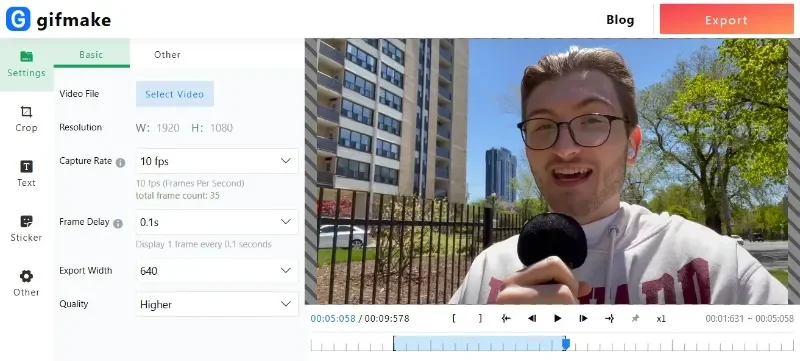
Convert your favorite video clips into memes, reaction GIFs, and more with our GIF maker. It's as simple as uploading your content, selecting the quality type according to your sharing destination, and sharing it with your online audience.
Whether you're creating GIFs for personal use, social media engagement, or business marketing, our tool provides all the features you need to create eye-catching animations that stand out. From funny reaction GIFs to professional product demonstrations, our video to GIF converter handles it all with ease and precision.
The instant download feature means you can create and share your GIFs immediately, without any unnecessary delays. This makes our tool perfect for time-sensitive content, trending topics, or last-minute marketing campaigns that need to be published quickly.
Choose the Size of Your GIF
We offer three size options for your GIF, allowing you to optimize your creation for different uses and platforms:
· Large (1080P): Opt for a large - sized GIF if you want high - quality animation. This is perfect for situations where visual clarity is crucial, such as product demonstrations, detailed tutorials, or professional presentations. The 1080P resolution ensures your GIF maintains the same clarity and detail as the original video, making it ideal for desktop viewing and high-resolution displays.
· Medium (480P): Select a medium - sized GIF for sharing on social media platforms. It strikes a perfect balance between quality and file size, making it ideal for quick sharing on Instagram, Facebook, and Twitter. The 480P resolution provides clear visuals while keeping file sizes manageable for mobile viewing and fast loading times.
· Small (240P): Choose a small - sized GIF if you want easy sharing across various channels. It has a smaller file size, allowing for faster uploads and downloads, making it perfect for text messages, chat applications, or platforms with strict file size limits. Despite the smaller size, our compression technology ensures your GIF maintains good visual quality and smooth animation.
Change the Aspect Ratio of Your GIF
Quickly adjust the aspect ratio of your GIF to suit different social channels, ensuring your content looks professional on every platform. You can choose from square (1:1), landscape (16:9), or portrait (9:16) sizes, covering all the most common social media formats.
If needed, you can also drag your GIF to fit the new format precisely, allowing you to frame the perfect moment and avoid awkward cropping or stretching. Our intuitive adjustment tool makes it easy to position your video clip exactly how you want it within the selected aspect ratio, ensuring important details aren't cut off and your GIF looks polished and professional.
Whether you're creating content for Instagram Reels, TikTok, YouTube Shorts, or traditional social media posts, our aspect ratio adjustment tool ensures your GIFs are perfectly formatted for maximum engagement on every platform.
Trim Your GIF Clip
Use our precise trimming tool to get straight to the most interesting part of your video, eliminating unnecessary footage and creating concise, engaging GIFs that capture attention immediately.
The handlebars allow you to set the parameters accurately, ensuring you capture exactly the moment you want in your GIF. With frame-by-frame precision, you can select the perfect start and end points for your animation, whether you're capturing a specific reaction, a key product feature, or a memorable moment from a video.
Our trimming tool is particularly useful for creating short, impactful GIFs that work well on social media, where attention spans are short and content needs to make an immediate impression. By trimming your video to the essential moments, you create GIFs that are more engaging and effective at conveying your message.
Do More with Your Videos on the Go
At gifmake.top, you can make professional - quality edits to your videos for free in seconds, no matter where you are. Our mobile-friendly design works perfectly on smartphones and tablets, allowing you to create high-quality GIFs from your video clips while on the move.
Shoot, edit, and share videos directly from your device across all your channels. Whether you're at an event, traveling, or simply away from your computer, our online tool gives you the power to create professional GIFs whenever inspiration strikes, without needing to download or install any software.
With our powerful tools at your fingertips, you can confidently edit videos without any hassle. The intuitive touch-optimized interface makes it easy to trim clips, adjust aspect ratios, and select the perfect GIF size, all from the palm of your hand. Stay productive and create engaging content no matter where your day takes you.
A Free, User - Friendly Online Video to GIF Converter
Create endlessly looped video sequences, animated reactions, and more with our Gifmake.top GIF maker. Our tool is designed with simplicity in mind, making it accessible to users of all skill levels - no technical knowledge or design experience required to create professional-quality GIFs.
GIFs are an excellent format for small files with high - quality animation, perfect for capturing attention in social media feeds, enhancing blog content, or adding visual interest to marketing emails. Unlike full video files, GIFs load quickly and play automatically, making them more likely to be viewed and engaged with by your audience.
Our video to GIF converter is the only tool you need to turn any video into impressive, animated images, and it's completely free to use with no hidden costs, no watermarks, and no registration requirements. We believe everyone should have access to professional-quality GIF creation tools without paying expensive subscription fees or dealing with complicated software.
Convert a Video to GIF Online in a Few Clicks
Converting a video to a GIF with gifmake.top takes only a few moments, making our tool one of the fastest and most efficient options available online. Upload your video from your device, select the desired size and quality of the GIF, and you're ready to go - no complicated settings or technical configurations to navigate.
Our platform makes it quick and simple to convert any video, regardless of its original format (MP4, MOV, WEBM, WMV, AVI, and more), into a high - quality GIF in a flash. Our advanced conversion technology processes your video quickly while maintaining the highest possible quality, ensuring your GIFs look professional and polished every time.
Unlike desktop software that requires installation and regular updates, our online tool is always up-to-date with the latest video formats and conversion technology. You can use it on any device with a modern web browser, without worrying about compatibility issues or system requirements.
Share Your Converted GIFs Effortlessly
gifmake.top also makes it easy for you to share your GIFs across all social media channels, helping you maximize the reach and impact of your content. After creating your perfect GIF, you can download it to your device and upload it directly to your favorite platforms, or use our sharing features to post directly to social media.
With our GIF editing features, you can instantly change the aspect ratio or trim the GIF to capture the exact moments you want from your video, ensuring your content is optimized for each platform you use. Different social media channels have different requirements and best practices for GIFs, and our tool gives you the flexibility to adapt your content accordingly.
With our app on your device, you can make quick conversions and edits even when you're on the move. Shoot your video, edit it to capture the perfect moment, convert it to a perfectly sized GIF, and share it on your social channels - all from your smartphone or tablet, no computer required.
Wherever you are, gifmake.top provides you with all the tools you need to connect with and impress your online audience. Create engaging, professional-quality GIFs that stand out in crowded social media feeds and help you build stronger connections with your followers and customers.
Rate Our Quick Action
We value your feedback and use it to continuously improve our video to GIF converter. You need to use the Quick Action before you can rate it, allowing you to experience all the features and functionality of our tool before sharing your thoughts.
Our rating system helps us understand what our users love about the tool and where we can make improvements, ensuring we continue to provide the best possible experience for everyone who uses our free video to GIF converter. We read every review and take all feedback seriously, making regular updates to enhance usability, add new features, and improve conversion quality.
Frequently Asked Questions
The gifmake.top convert to GIF tool makes it quick and easy to save a video as a GIF. Simply upload your video to the converter, make any necessary adjustments to size, aspect ratio, or duration, and instantly save your new GIF to your device. Our conversion technology preserves the quality of your original video while creating a perfectly optimized GIF file that can be used on any platform that supports GIF format.
Unlike some conversion tools that produce low-quality GIFs with choppy animation, our advanced processing ensures smooth, clear animations that maintain the visual quality of your original video, making your converted GIFs look professional and polished.
Our convert to GIF tool accepts MP4 files, as well as MOV, WMV, AVI, WEBM, and many more video formats. Converting an MP4 to a GIF is simple: 1) Click the "Use Now" button to access our converter, 2) Upload your MP4 file (up to 2GB), 3) Customize your GIF settings (size, aspect ratio, trim as needed), 4) Download your high-quality GIF to your device. You can check the full list of supported video files on our platform, but we support all the most common video formats used today.
MP4 is one of the most common video formats, and our tool is specifically optimized to handle MP4 files efficiently, producing high-quality GIFs with fast conversion times and minimal quality loss.
Yes, you can share any GIF you make on gifmake.top on all major social media platforms including Instagram, Facebook, Twitter, TikTok, LinkedIn, and more. After uploading your video to the GIF converter, select your desired file and GIF size (we recommend 480P for most social media platforms), then click Download. From there, you can upload it to any social channel you wish.
Our tool's aspect ratio adjustment feature is particularly useful for social media, allowing you to create GIFs in the perfect dimensions for each platform (square for Instagram posts, portrait for TikTok/Reels, landscape for Twitter/Facebook). This ensures your GIFs look professional and aren't awkwardly cropped by the platform's display settings.
Yes, we offer a free plan for everyone that includes complete access to all our video to GIF conversion features with no limitations. This includes 2GB file upload limit, all three GIF size options (1080P, 480P, 240P), aspect ratio adjustment, precision trimming tool, support for all major video formats, and instant downloads with no watermarks. Visit our plans and pricing page for details on any premium features, but the core video to GIF conversion functionality will always remain free to use for all users.
We believe in providing essential creative tools for free, and our free plan has no usage limits - you can convert as many videos to GIFs as you need for personal or commercial use, with no time restrictions or hidden costs.
No registration, account creation, or email verification is required to use our video to GIF converter. We respect your privacy and want to make GIF creation as simple and accessible as possible. Simply visit our website, click "Use Now", upload your video, customize your GIF settings, and download your creation - no personal information required at any step of the process.
We do not store your videos or created GIFs on our servers beyond what's necessary to process your conversion, and all uploaded files are automatically deleted after 24 hours to protect your privacy and intellectual property.
No, you are free to use any GIF created with Gifmake.top for both personal and commercial purposes, including marketing, advertising, social media, and business communications. There are no restrictions on how you use your created GIFs, and you do not need to provide attribution to our site when using your creations.
We only ask that you respect copyright laws and do not upload or convert videos that you do not have the rights to use. For commercial use, ensure you have the necessary permissions for any video content you convert to GIF format.
🔥 Get Started Free
Create high-quality GIFs from any video in seconds - no registration, no watermarks, 100% free.
gifmake.top →【video to gif】